SW SoaringWeather Open map

User manual

Using SoaringWeather

Use the map to see where the air is working at a forecast hour, how high it goes and where cumulus will form. Tap a spot for its values from the ground up, then open its meteogram to see how the soaring day develops. The screenshots are real examples from the Alps; they show a past forecast and are here to explain the controls.

01 / Map

Read the map

The map shows one forecast hour; the Map menu chooses what: the lift at a height, the ceiling, the LCL or the surface wind. Use it to compare areas and plan where to go. Click or tap a spot for its point readout, double-click or double-tap for its meteogram.

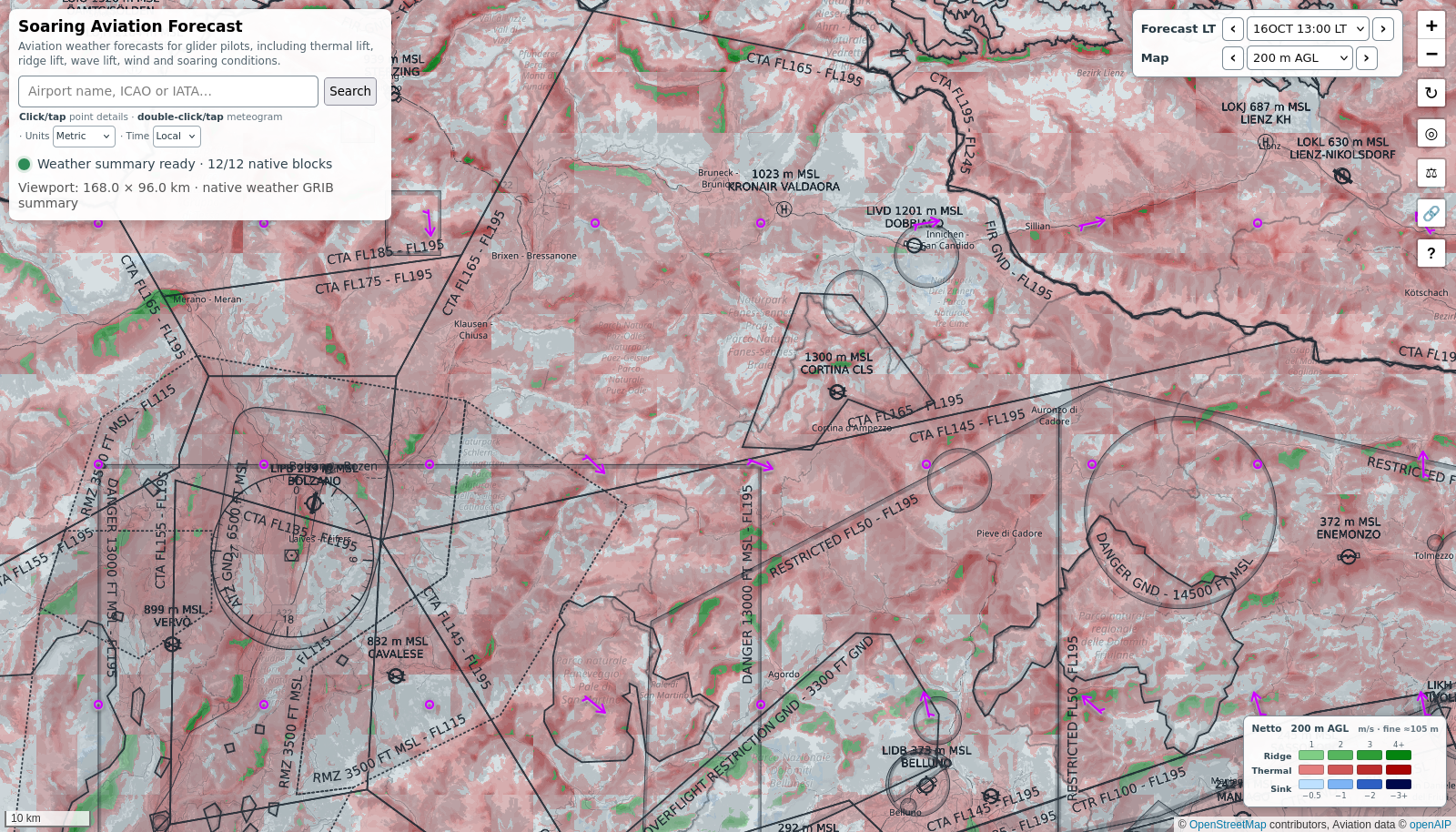
Real SoaringWeather map over the Dolomites: the search and Units and Time panel, the Forecast and Map menus set to 16 Oct 13:00 and 200 m AGL, wind arrows, red thermal lift, green ridge lift, the map buttons and the lift legend
Real map example: Dolomites, forecast for Fri 16 Oct 2026 at 13:00 local time, lift at 200 m AGL. Captured 15 Oct 2026. Swipe the image sideways to inspect it.View full size ↗

Units: Metric or Imperial

Use Units below the search box to change the numbers shown across the site. Metric uses metres for height, m/s for lift, km/h for wind and °C for temperature. Imperial uses feet, knots and °F, as on many varios. The selected forecast hour and height do not change when you switch units, and your choice is remembered next time.

Time: Local or UTC

Use Time beside Units to choose the clock used for forecast labels. Local follows your device’s time zone; UTC is the clock used in aviation briefings and flight plans. Switching changes the displayed hour on the map, point readout and meteogram, but keeps the same forecast moment; your choice is remembered.

Good to know

The hour and height belong together: changing either can change the picture. An area that works well at 1000 m AGL at 14:00 may be weak lower down or later in the day, so step through both before you plan a task.

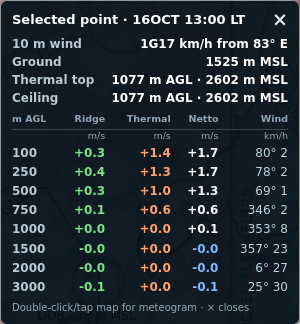
Real point readout: 10 m wind, ground 1525 m MSL, thermal top and ceiling 1077 m AGL / 2602 m MSL, and Ridge, Thermal, Netto and Wind by height AGL
Point readout from the map example.

Point readout: click or tap

Click or tap a map location to open this card. It shows the forecast at that spot from low down to high up. Moving the pointer alone does not open it; close it with ×.

The first lines show surface wind and gusts, the ground elevation (MSL), the forecast thermal top and the ceiling, each in AGL and MSL. The table then splits the lift into its parts at each height AGL, with the matching MSL altitude so you can compare it with airspace limits. A dash means no data, not zero.

RidgeOrographic lift or sink: what the terrain does to the air, including ridge, lee and wave effects.
ThermalThe thermal part at that height.
NettoBoth together: how fast the air itself goes up (positive) or down (negative), as a netto vario would show.
WindDirection and speed at that height. Surface wind and gusts are above the table.

02 / Lift

What produces the lift on the map?

The forecast has two sources of lift for each place, hour and height. The point readout shows both; the map colors show the two added together, called Netto.

ThermalRising and sinking air driven by the sun heating the ground. The picture below shows sunshine, different ground, a cumulus and a thermal drifting with the wind.
OrographicAir pushed around by the terrain: ridge lift on the windward slopes, sink in the lee and mountain waves farther downwind.
Netto · what you see on the mapThermal and orographic lift added together. The map shows the overall lift or sink; the color tells you which source does most of the work.
THERMAL Thermal lift in the afternoonSun warms mixed terrain; warm air rises as a drifting thermal toward a cumulus cloud, while a glider circles in the rising air. Sun warms the groundCumulus may mark liftRising air Ground heating differs from place to place

Thermals

Warm air breaks away from the ground and rises; you circle in it to climb. Thermals drift with the wind, and blue thermals work without any cumulus to mark them.

Sunshine, cloud shade, wind and the type of ground make thermals vary through the day and over short distances. The red areas show where thermals do most of the work in the forecast, not the exact position of a single thermal.

OROGRAPHIC · RIDGE & LEE Wind over a ridgeWind blows from left toward a mountain, rising on the windward slope and descending into the lee behind it. Wind toward the ridgeWindwardLee Air risesAir may sink

Ridge lift and lee sink

Wind blowing onto a slope is pushed upward on the windward side, and you can soar along the ridge in it. Behind the ridge, descending air brings sink, turbulence and possibly rotor. The same slope can work very differently when the wind changes direction or strength.

Green means ridge or wave lift does most of the work. Blue means sinking air overall; expect it in the lee, but it can appear elsewhere too.

OROGRAPHIC · MOUNTAIN WAVES Mountain waves downwind of high terrainWind crosses mountains and forms broad waves farther downwind, with alternating rising and sinking air and a smooth lenticular cloud above a crest. Wind crosses high groundWaves downwind liftsinklift

Mountain waves

In stable air with strong enough wind, the airflow keeps rising and falling in broad waves downwind of high terrain. Bands of lift and sink can repeat well beyond the ridge. Lenticular clouds often mark a wave, but waves can exist without them.

The orographic forecast includes wave at the selected height. Check several heights: the wave higher up can be very different from what you find close to the ground.

Conceptual pictures only. Actual lift, sink and cloud positions can differ from the forecast.

03 / Reading the colors

One color for the overall lift

The map colors show the overall rising or sinking air at the selected time and height. Where the air is rising, the color tells you which kind of lift does more of the work.

Green · terrain

Usable lift, mainly from ridge or wave rather than thermals. Darker green means stronger lift.

Red · thermal

Usable lift, mainly thermal (at least as strong as the ridge or wave part). Darker red means stronger lift.

Blue · sink

Sinking air overall. Darker blue means stronger sink; plan to cross it quickly.

Little color

Little or no lift forecast at that height, or no lift data for that area and hour. Tap a point for detail.

Read the legend

The numbers beside the color chips are vertical air speed. In Metric, m/s means metres per second; in Imperial, lift is shown in knots. The colors show how the air moves (netto), not your climb rate: your glider sinks too, typically about 0.6–1 m/s while circling, so subtract that for the climb you can expect on the vario.

Ceiling and LCL: how high can I climb?

The Ceiling & LCL entries of the Map menu replace the lift colors with a height:

  • Ceiling AGL: how high the lift takes you, above the ground below you - the thermal top, or higher where ridge or wave lift (more than 0.1 m/s) works above it. On a cold day without thermals the ridge or wave still shows.
  • Ceiling MSL: the same height above sea level, to compare with airspace limits and between turnpoints.
  • LCL MSL: the lifting condensation level above sea level - where the rising air of the thermals condenses, i.e. the cumulus base (Cu base) when thermals reach it. It is a property of the air mass, so the map shows it as a smooth field. Grey means the thermals stay below it: blue thermals, no cumulus. This is not the VFR cloud base of METAR/TAF: layer cloud (stratus, frontal cloud) does not show here; the meteogram's cloud rows show it.

Always the same colors

Heights are painted on a smooth, fixed scale from blue at the ground through green and yellow to red at the top of the range: 3000 m for the ceiling above ground, 5000 m for the maps above sea level; higher stays red. The scale never rescales, so after a few days you read a map at a glance: on the AGL map yellow-green is about 1500 m, red 3000 m and more. The legend shows the scale in your units.

Where the forecast has learned that the ground heats better than its surroundings, such as a sunny rocky slope, the thermals there are a little warmer and reach a little higher. The thermal top and the ceiling include that, most on weak days, hardly on hot ones.

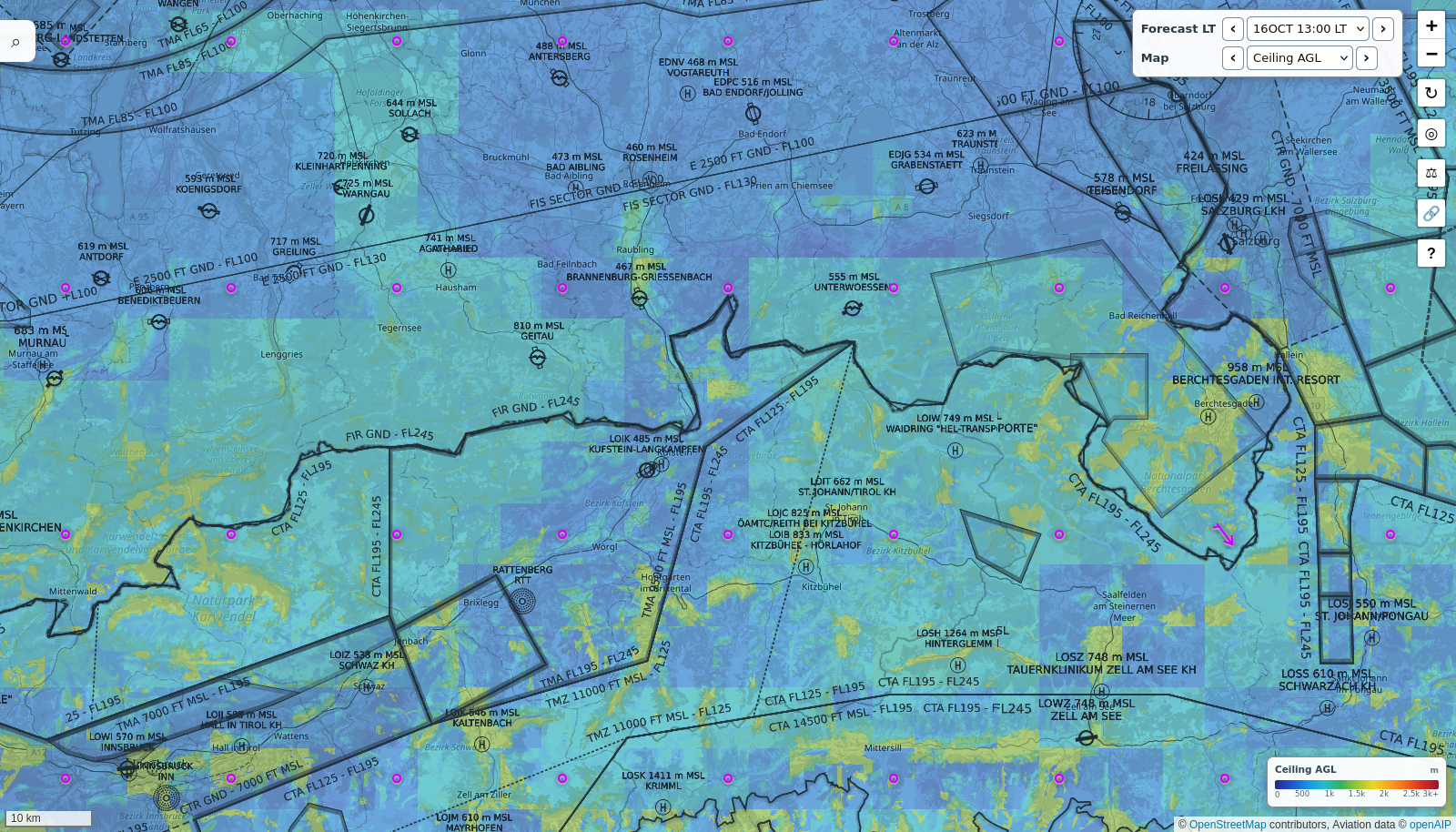
Real Ceiling AGL map over the Bavarian Alps for 16 Oct 13:00: blue where the lift ends low, cyan to yellow-green around 1000 to 1500 m above the ground over the mountains, with its height legend
Real Ceiling AGL example: Bavarian Alps, Fri 16 Oct 2026, 13:00 local time. On a weak October day the lift ends low over the flatland (blue) and reaches 1000-1500 m above the ground over the mountains (cyan to yellow-green). Swipe the image sideways to inspect it.View full size ↗

04 / Resolution

How precisely can I read the map?

The map legend states the approximate size of its finest colored detail where you are looking. Treat that as map detail, not a promise that a thermal or wave will be at exactly that spot.

Use the “fine ≈” label

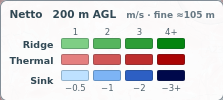
In this screenshot, fine ≈ 105 m means adjacent fine map details are about 105 metres apart on the ground in this area. The displayed number can change when you move to another latitude.

Cloud and wind patterns can be broader than those colored details. Zooming in enlarges the picture; it does not make the forecast more certain. Before you count on a small patch, compare nearby points and hours.

The real legend

Actual lift legend showing Netto, 200 m AGL, m/s, fine approximately 105 m, and Ridge, Thermal and Sink color scales

The four color chips show increasing strength. The current AGL height and units are printed at the top.

05 / Meteogram

Read one place through time

Double-click or double-tap a map location to open its meteogram. The map is one hour over an area; the meteogram is one place over the whole forecast, from the ground up. Use it to find when the day starts working, how high it goes and when it dies.

The Units and Time switches are also in the meteogram’s top-right corner. They follow the same choices as the map controls.

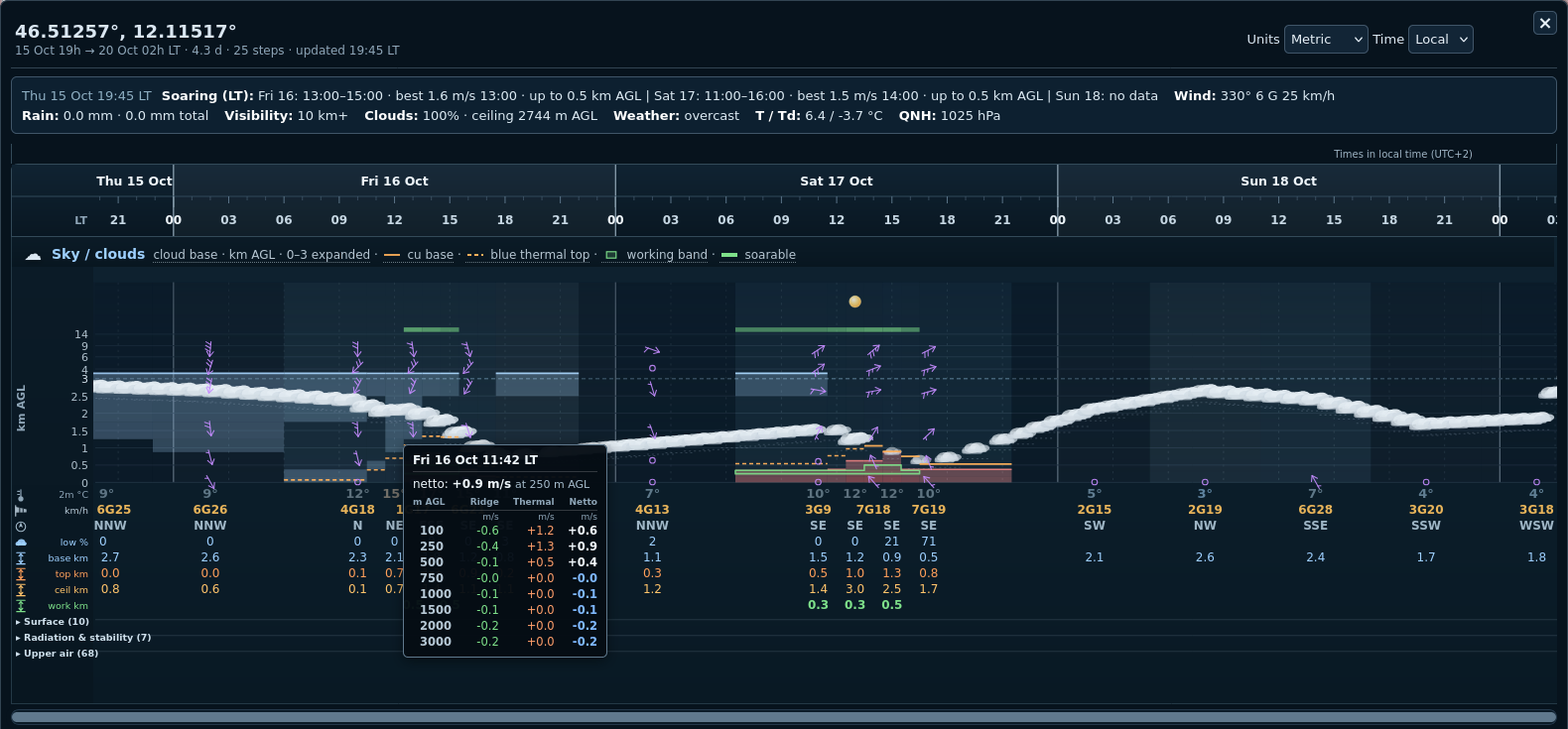
Real SoaringWeather meteogram for a Dolomites point: the soaring-hours summary, the local-time axis, the sky and cloud picture with lift bands, the Soaring rows including thermal top and ceiling, and an open lift readout
Real meteogram for a Dolomites point, captured 15 Oct 2026. The lift readout is open for Fri 16 Oct 11:42. Swipe the image sideways to inspect it.View full size ↗

Hover or tap for the lift profile

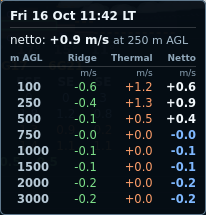
Real meteogram lift readout: Fri 16 Oct 11:42 LT, netto +0.9 m/s at 250 m AGL, with Ridge, Thermal and Netto at each height from 100 to 3000 m

In this example, the forecast at that hour shows +0.9 m/s Netto at 250 m AGL: +1.3 m/s thermal, less 0.4 m/s lee sink. The rows show how the ridge/wave (Ridge) and thermal parts change with height. On a phone, tap the colored lift area for the same readout.

The sky chart is only the top part of the meteogram. Below it, the Soaring rows (cloud base, thermal top, ceiling, working band, wind, temperature, rain, low cloud) are always shown. Tap the Surface, Radiation & stability (sunshine, CAPE, CIN) and Upper air (wind and temperature aloft) headers to open or fold them; the meteogram remembers which ones you keep open.

A useful reading order

  1. Check the hour. Make sure whether you are reading local time or UTC.
  2. Look at the sky. Overdevelopment, spreading cloud, rain and poor visibility can spoil a day that looks good on lift alone.
  3. Look through the height band. Lift may only start above your release or winch height, stop below cloud base, or alternate with sink.
  4. Check the wind. Speed and direction: will the ridge work, will the thermals be torn, is the crosswind on the runway acceptable?
  5. Compare neighboring hours. A short peak is not the same as a long soaring window; it decides how far you can go.

Soarable hours are a quick signpost for daylight hours when the forecast lift looks good enough to climb. They are a planning aid, not a guarantee that you can stay up. The green working band in the sky view shows the height range in which the forecast expects usable climbs.

Close the meteogram with × or Esc. While it is open, the arrow and Page Up / Page Down keys scroll it, and it updates itself when a newer forecast arrives; the header shows when it was last updated.

Map and point can differ

The point readout and the meteogram are calculated on request for exactly that spot, at more heights and on finer terrain than the map, which is prepared in advance for whole areas at a few heights. They may also use a newer forecast run than the map colors, which are refreshed after each run is processed. So a lift value, a thermal top or a ceiling at a point can differ a little from the map underneath it. For a particular spot, trust the point readout and the meteogram; use the map to compare areas.

06 / More tools

Buttons on the map and other handy features

The small buttons in the map corners, and a few things the site does for you.

Map buttons

  • 🔗 Share: copies a link to exactly this view (position, zoom and forecast hour), e.g. to send your club the plan for tomorrow. Whoever opens it sees the same picture.
  • ◎ My location: centres the map on where you are (your browser asks for permission first).
  • ↻ Reload: fetches the forecast colors again, e.g. after a new forecast run.
  • ⚖ Disclaimer: shows the disclaimer again. It opens by itself on your first visit and whenever it changes.
  • ? Help: opens this manual in a new tab; the map stays as it is.

Airspace on the map

Where available, airspace from openAIP is drawn over the forecast. Airspace limits are in MSL or FL, while the lift heights are AGL. The point readout therefore gives each AGL height together with its MSL altitude, so you can see whether a good climb would take you into controlled airspace.

Pages for gliding sites

Popular gliding sites have their own address, such as soaringweather.com/Wasserkuppe. It opens the map at the site with its meteogram on top, so you can bookmark your home field and see its soaring day with one tap.

See available places ↗

Remembered settings

The site remembers your units, time format, the meteogram sections you keep open, and where you last looked at the map, so the next visit starts where you left off. If you have already allowed this site to use your location, a first visit opens at your position.

07 / Glossary

Quick glossary

Short labels and terms used on the map and in the meteogram.

AGL
Above ground level: height above the terrain directly below a point.
MSL
Mean sea level: altitude measured from sea level rather than from the local ground.
UTC / LT
UTC is the common world clock; LT is local time in your device’s time zone.
Ridge / orographic
Lift or sink caused by airflow over terrain, including ridge, lee and wave effects.
Thermal
A column of rising air created by the sun heating the ground.
Thermal top
The forecast upper limit of thermal lift above the ground; above it only ridge and wave lift remain. A place that heats better than its surroundings gets a slightly higher one.
Ceiling
How high the lift takes you: the thermal top, or higher where ridge or wave lift (more than 0.1 m/s) works above it.
Netto
Ridge and Thermal added together: the vertical speed of the air itself; positive means rising air, negative means sink.
Netto vs climb
Your climb rate is netto minus your glider's own sink rate while circling (typically 0.6–1 m/s, about 1.2–2 kt).
Sink
Descending air, shown in blue when the combined forecast is negative.
Windward / lee
The side facing the wind / the sheltered side downwind of terrain.
Mountain wave
Alternating bands of rising and sinking air downwind of high ground, often marked by lenticular clouds.
CAPE / CIN
CAPE: energy available for rising air, high values can mean overdevelopment and showers. CIN: the lid that must be overcome before thermals or convection start.
≈ hour
A forecast hour filled in between two model hours.
Soarable hours
Daylight hours with forecast lift good enough to climb; not a guarantee of flying conditions.
Working band
The height range in which the forecast expects usable climbs.
Cloud base
The approximate bottom of a cloud layer, of any kind (the meteogram's base row).
LCL
Lifting condensation level: the height where rising thermal air condenses - the cumulus base (Cu base) when thermals reach it. Not the VFR cloud base: layer cloud does not show on the LCL map.
Blue thermals
Thermals that stay below the condensation level, so no cumulus forms; grey on the LCL map.
Wind direction / VRB
Wind direction says where the wind comes from; VRB means the direction varies.
12G18
Wind speed 12, gusting to 18, in the wind unit selected under Units.
QNH
An air pressure setting used to read altitude above mean sea level on an altimeter.
FL / CTA
FL is a flight level based on standard pressure; CTA marks a controlled airspace area.
NOTAM
An official notice about current or temporary aviation information.
08 / Disclaimer

Disclaimer

SoaringWeather.com is a free, non-commercial project run by a private individual. It provides automatically generated soaring and aviation weather forecasts for general information. Forecasts and maps may be incomplete, delayed or inaccurate, and the service may be unavailable. Small-scale lift can change quickly and may differ substantially from what is shown.

This site is not an official aviation weather briefing and should not be the sole basis for a flight decision. Before flying, consult current official weather reports and forecasts, NOTAMs and airspace information for the intended flight. During flight, monitor actual conditions and any available updates. The pilot in command is responsible for assessing conditions and conducting the flight safely.

The site and its content are provided "as is" and "as available", without any guarantee of accuracy, completeness, timeliness, suitability for a particular purpose or uninterrupted availability. The author does not assume responsibility for any flight decision or for reliance on the site or its content.

Use this site entirely at your own risk. The author accepts no responsibility or liability whatsoever for any decision or action taken on the basis of this site, or for any loss, injury, death, damage or expense arising directly or indirectly from the site, its content, errors, omissions, delays or unavailability, including where negligence is alleged.

Weather data: Deutscher Wetterdienst (DWD). Map data: OpenStreetMap contributors. Airspace data: openAIP. Third-party source data may also contain errors or omissions.